All Cards
* On smaller devices swipe left to view hidden table data
| Ribbon/Toolbar (Software) | Button | Function | Error Type | Description | ||
|---|---|---|---|---|---|---|
| Ribbon/Toolbar (Software) | Button | Function | Error Type | Description | ||
| Card 800 View | All products (Security and Licensing) | None | None | Ff60 Or Ff3 Or Rh60 Or Rsn60 Or Rl60 | Hydratec Security Lock Error
For example:
|
|
| Card 798 View | HydraBID (Standalone) | Open | None | None | when picking New Take Off Sheet
|
|
| Card 797 View | HydraCALC (Revit Based) | Calculation Process | Continue | Unhandled Exception | When picking the continue button one gets an error message "Unhandled Exception... Item has already been added. Key in Dictionary. 'a number' Key being added: 'same number' |
|
| Card 796 View | HydraCALC (Revit Based) | None | None | Bad Location Of K-Factor | Bad location of K-Factor
|
|
| Card 795 View | HydraCAD (Revit Based) | Spacing and Layout | Select | 0 |
|
|
| Card 55 View | Calculations (AutoCAD Based) | Start Autocalcs | None | Unhandled Exception | Unhandled exception: Input string not in correct format |
|
| Card 64 View | Calculations (AutoCAD Based) | Start Autocalcs | None | None | Step 1a.6 - attaching nodes Hangs pause pauses locks freezes |
|
| Card 463 View | Launching HydraCAD (AutoCAD Based) | None | None | None | 1. Missing profile 2. Bad registry entry 3. User does not have Admin privileges Unable to find profile Installation Acad 2015~ |
|
| Card 260 View | Launching HydraCAD (AutoCAD Based) | None | None | Security Error | When opening HydraCAD, you only receive this error message and not a HydraKEY error with the golden X. If you receive a HydraKEY error, search for the linked HydraCARD in that message box as it takes priority.
Security Error: One of the following conditions is possible HydraCAD is unable to function under these conditions.
After AutoCAD opens, press F2 to view the command prompt, see if the text below appears. If yes, see solution 1. Could not find file HCAD_ENV.INI Is 2024; error: no function definition: PRINTEM
|
|
| Card 389 View | 3D Modeling (AutoCAD Based) | Show System Model | None | None | Upon starting the Show 3D command (S3D) the drawing immediately switches to SE isometric, reports no errors but no 3D piping is visible. Even newly drawn pipe won't elevate.
Drawing successfully elevated to 3D. No errors were found |
|
| Card 165 View | Listing (AutoCAD Based) | Start Autolist | None | Dao Error | Call from AutoList::AddLineItemsToDatabase DAO Error changes requested to table not successful - create duplicate values in the index, primary key.... The line it failed to write is logged in C:\HES\TEMP\DAOUpdateError.txt Also: DAO Server Error RSU Update Call from Autolist DAO Error |
|
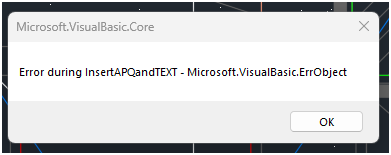
| Card 330 View | Calculations (AutoCAD Based) | Figure Head Area | None | None | When using the Figure Head Area tool, you get this error
Error during APQ insert - Microsoft VisualBasic ErrObject Error during LoadAPQFile - eFileNotFound Error during InsertAPQandTEXT |
|
| Card 138 View | Calculations (AutoCAD Based) | Start Autocalcs | Calc Area # | Missing File |
File name asked for does NOT exist FitExch.dat 1.a.1 |
|
| Card 340 View | Hangers (AutoCAD Based) | Create 3D Hangers | None | None | Create 3D Hangers command did not created 3D hangers for the #01B hanger assembly but it did for all other hanger assembly types. #01B 3D hanger information is not in the DAT file. HydraCAD v50 |
|
| Card 176 View | Listing (AutoCAD Based) | Start Autolist | None | Failed To Launch |
"AutoLIST Failed!... Please run Listing CheckUps"
This message is shown when running the AutoLIST process, but checkups didn't find any errors AutoLIST Failed |
|
| Card 74 View | Calculations (AutoCAD Based) | Start Autocalcs | None | None | Step 2.3 - After one pass through calculations Miscfunc hangs.... Also possibly "Hydraulic Engine not responding" and a "Runtime Error 62 input past end of file" |
|
| Card 71 View | Calculations (AutoCAD Based) | Start Autocalcs | None | None | When starting AutoCALC, it stops in the v50 Fuel Gauge at step 1a.4 - Calculating Total Lengths. Working on the pipe from node #### to node #### with a fitting string of ...
May be followed by a Runtime Error 13 or Runtime Error 5 |
|
| Card 660 View | HydraCALC (Standalone) | Calculate | Calculating | Process Error | Primary calc results are shown, and when selecting OK to continue back to the calc input screen, the two messages below are displayed, twice;
"The designated source node was not found in the list of pipes" OK "Calculation failed for an unknown reason" OK Process Error Hydcalc |
|
| Card 545 View | Piping (AutoCAD Based) | Auto Line | None | No Connectable Heads | No connectable heads found within distance specified for the line illustrated, or heads were already connected ...
No connectable heads message comes up, even when there are obviously heads that can be connected. Can also be error stating Please re-select line away from other lines |
|
| Card 186 View | Listing (AutoCAD Based) | Start Autolist | None | Unhandled Exception | AutoCAD Error Aborting FATAL ERROR: Unhandled Access Violation Reading 0x00e0 Exception at [hex code here] Acad 2019 hex code; 2D92713Eh Fatal Error
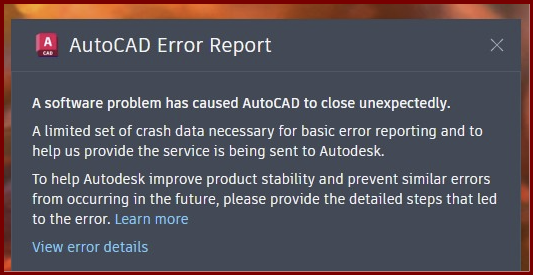
Hex code a51b726eh Or no error at all. Autocad freezes then crashes without an error other than the AutoCAD Error Report
A software problem has caused AutoCAD to close unexpectedly |
|
Page: