All Cards
* On smaller devices swipe left to view hidden table data
| Ribbon/Toolbar (Software) | Button | Function | Error Type | Description | ||
|---|---|---|---|---|---|---|
| Ribbon/Toolbar (Software) | Button | Function | Error Type | Description | ||
| Card 842 View | Launching HydraCAD (AutoCAD Based) | Display | Status Line | None | When user moves mouse around, Status bar moves around and displaces Paper Space tabs |
|
| Card 841 View | HydraCAD Residential (AutoCAD Based) | Installation | Installing | Many | Difficulty installing or difficulty opening HCAD-R after installing. This is a 40 step description of the installation process which lists potential errors and how to overcome them to complete the installation and configuration. |
|
| Card 840 View | Calculations (AutoCAD Based) | Start Autocalcs | Finish Area | None | AutoCALC is creating extra node points where there shouldn't be. In the image below, node 45 shouldn't be created as there's neither a flowing head nor a change in diameter at that point.
'extra node' 'extra ref point' 'extra reference point' 'refpt' |
|
| Card 839 View | HydraKEY (Security and Licensing) | Add New Authorization | None | Failed Call To Server | A failure to call the Hydratec security server occured.
-OR-
Hydratec Security Error FAILED CALL TO SERVER (to Activate): Could not parse request body into json.
|
|
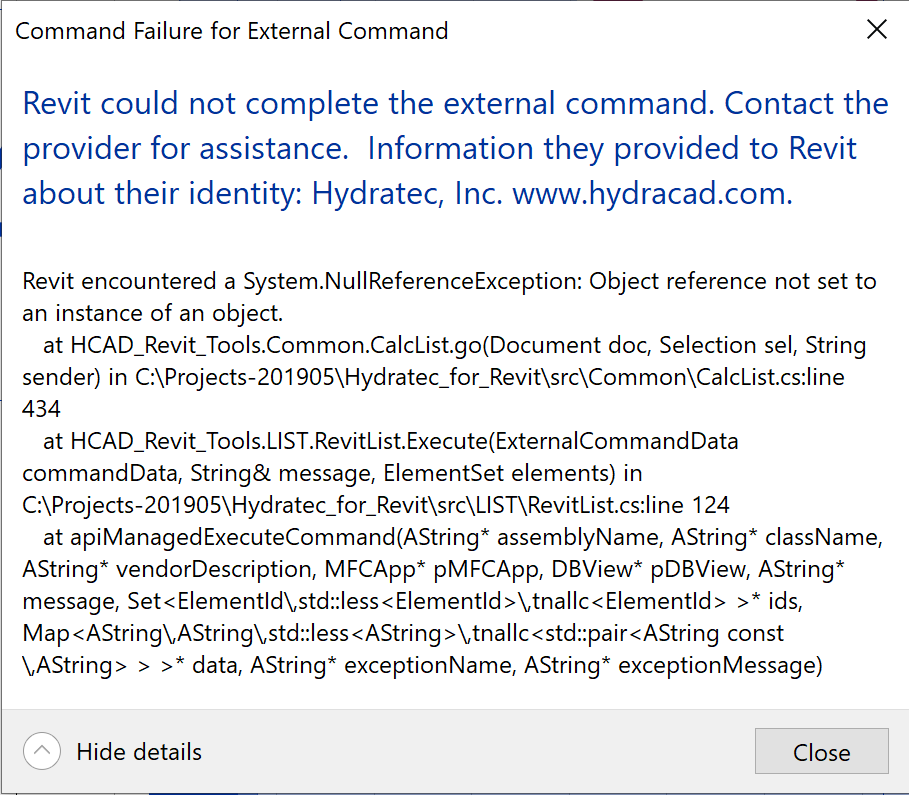
| Card 838 View | HydraLIST (Revit Based) | Create Stocklist | None | Revit Could Not Complete The External Command. | Revit could not complete the external command System.NullReferenceException |
|
| Card 836 View | HydraCAD (Revit Based) | Spacing and Layout | New Head from Selector | Value Cannot Be Null | Unhandled exception has occurred in a component in your application.
|
|
| Card 835 View | HydraLIST (Standalone) | Print Labels | None | None | Printing labels with Bar Codes, might be no message, might be a message about missing font Free 3 of 9 Bar codes printout as letters & numbers. |
|
| Card 834 View | HydraLIST (Standalone) | HydraVIEW | None | None | No error. Pick Setup and nothing happens.
|
|
| Card 833 View | HydraLIST (Standalone) | Process to PDF | PDF Printing | Pdf Blank | PDF blank |
|
| Card 832 View | Launching HydraCAD (AutoCAD Based) | None | None | None | Unable to find Default Profile:
|
|
| Card 831 View | Calculations (AutoCAD Based) | Start Autocalcs | None | Runtime Error | Caclulating Total Lengths... Runtime Error "13" Type mis-match |
|
| Card 830 View | HydraCALC (Standalone) | HydraCALC | File Save | No Connectable Heads | While working on a calc file which is saved to a network location, any changes or revisions where were made, then saved, won't be there when the file is opened again. File doesn't save File doesn't update
|
|
| Card 829 View | HydraVIEW (Standalone) | Open | None | Unknown Filetype | Unknown Filetype Unknown filetype being opened - 'HLPF' Path of the file is then shown... |
|
| Card 828 View | HydraLIST (Standalone) | Process | None | None | After processing the list, no ITF file ( Inventory Transfer File) is created |
|
| Card 827 View | HydraLIST (Standalone) | Open | None | Runtime Error | Run-time error 3044 |
|
| Card 826 View | HydraCALC (Revit Based) | Hydraulic Calculations | Continue | None | Error 76 Path not found. |
|
| Card 825 View | Installation (AutoCAD Based) | None | None | The Installed Version Could Not Be Determined | The Installed version of the application could not be determined. The Setup will now Terminate-or- An error (-5006 : #####) has occured while running the setup |
|
| Card 824 View | HydraCALC (Revit Based) | Supply Point | Pick | Revit Could Not Complete The External Command. | Command Failure for External Command.... Revit could not complete the external command.
|
|
| Card 823 View | HydraBID (Standalone) | None | None | Runtime Error |
|
|
| Card 822 View | HydraCAD Residential (AutoCAD Based) | Perform Hydraulic Calculations | None | Runtime Error | Runtime error 9 |
|
Page: