Your Quick Search:
"Define Supply"
Software:
Total results: 44 (Closest matches are returned first)
Page:
* On smaller devices swipe left to view hidden table data
| Ribbon/Toolbar (software) | Button | Function | Error Type | Message | ||
|---|---|---|---|---|---|---|
| Ribbon/Toolbar (software) | Button | Function | Error Type | Message | ||
| Card 35 View | HydraCALC (Revit Based) | Define Supply | Pick | None | Too many Water Supplies! error message when using the Define Water Supply function |
|
| Card 1286 View | HydraCALC (Revit Based) | Define Supply | None | Command Failure For External Command | Command Failure for External Command... The Parameter is Read-Only
|
|
| Card 1149 View | HydraCALC (Revit Based) | Define Supply | None | Command Failure For External Command | Revit could not complete the external command... Autodesk.Revit.Exceptions.InvalidOperationException
|
|
| Card 986 View | HydraCALC (Standalone) | Calculate | Calculation Results | Pressure Required Is Negative | When running a calculation, the value for "pressure required" shows a negative value.
|
|
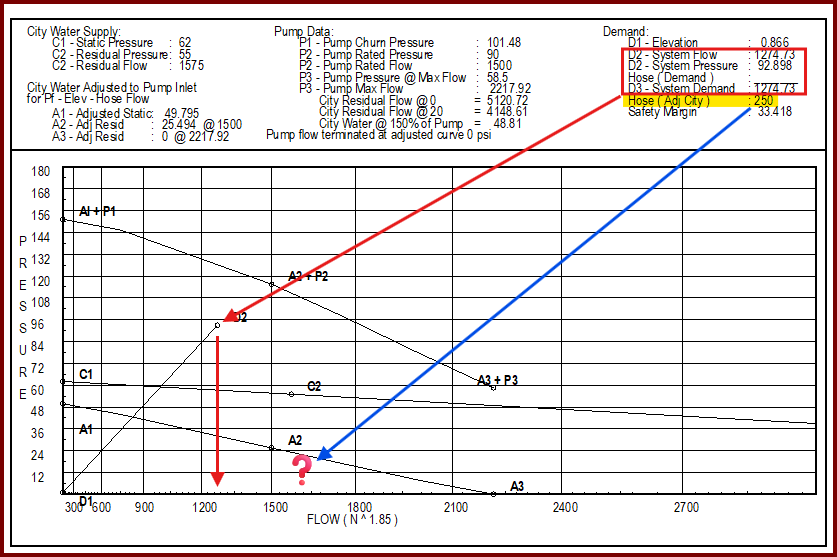
| Card 1406 View | HydraCALC (Standalone) | Print Final | None | When printing final, your outside hose demand after the pump isn't included in the total flow.
In the example above, the system demand is 1274 gpm is represented by point D2/D3. The outside hose adds up to another 250 gpm but there isn't another marker at 1524 gpm *Please note, while the Demand summary at the top shows D3 as a point, since D2 and D3 are the same value, the graph will only show point D2. |
||
| Card 1181 View | HydraLIST (Standalone) | Head Selector | None | Sprinkler Not Properly Configured | While using the 'Choose Part Number' button to open HydraHEAD Selector and retrieive its description and part number, you get the errors below;
Runtime Error 713, Application-defined or object-defined error
|
|
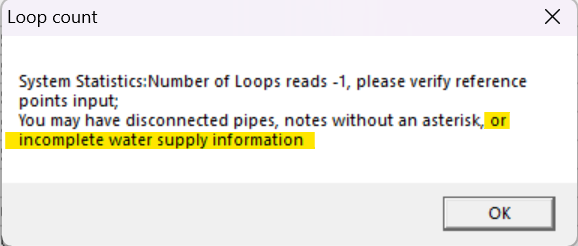
| Card 1438 View | HydraCALC (Standalone) | Calculate | Calculation Results | None | When running a calc, you first get this error indicating a number of possibilities.
Then the Pre-calc Questions window pops up with a warning.
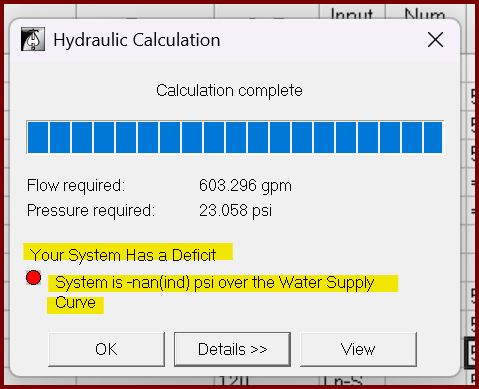
But you go ahead with the calculation anyway and get this result Your System Has a Deficit System is -nan(ind) psi over the Water Supply Curve
|
|
| Card 979 View | HydraCALC (Standalone) | Calculate | Calculation Results | System Is -Nan(Ind) Psi | After calculating the system, the results show, "Your System Has a Deficit" System is -nan(ind) psi over the Water Supply Curve
|
|
| Card 926 View | HydraCALC (Standalone) | Calculate | Calculating | Message Box | Upon calculating a file, the error message, "Failed to launch C:\HES\Hydratec for revit\programs\calcdiagnose.exe" pops up.
Was preceeded by these messages;
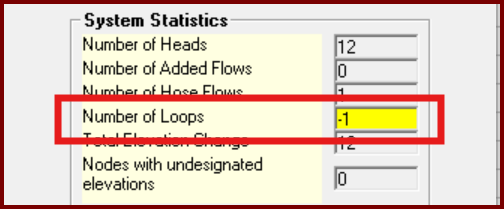
Plus this; Number of Loops -1 and or Nodes with undesignated elevations
|
|
| Card 266 View | Sprinklers (AutoCAD Based) | Insert Sprinkler | Head Block Definition | None | HydraCAD locks up when trying define a new sprinkler head. You have to CTRL+ALT+DEL to shut down Acad. |
|
| Card 316 View | Display (AutoCAD Based) | None | None | Missing Dialog Box | Command is run, but nothing appears to happen. May get Nil message
|
|
| Card 781 View | Sprinklers (AutoCAD Based) | Select Sprinkler | Choose Part Number | Sprinkler Not Properly Configured | While using the 'Choose Part Number' button to open HydraHEAD Selector and retrieive its description and part number, you get the errors below;
Runtime Error 713, Application-defined or object-defined error
Sprinkler not properly configured. Please re-select using 'Choose part'
|
|
| Card 807 View | Sprinklers (AutoCAD Based) | FSC Setup | None | Unhandled Exception | When trying to open the dialogue box to define a Flexible Sprinkler connection, the following message box error appears.
Could not find file; FSC-INSERTDEFLINE.txt |
|
| Card 983 View | HydraCALC (Revit Based) | Hydraulic Calculations | Continue | None | HydraCALC for Revit Setup... Unhandled Exception
|
|
| Card 422 View | 3D Modeling (AutoCAD Based) | Show System Model | None | None | Sprinkler heads not defined in the drawing or no 3D block assigned for a sprinkler head. Going to Navis only - corrupt Persistent Model drawing? eKeyNotFound Dialog box HydraCAD |
|
| Card 397 View | 3D Modeling (AutoCAD Based) | Show System Model | None | None | 1. Heads not defined show flexdrops |
|
| Card 1281 View | 3D Modeling (AutoCAD Based) | Show System Model | None | None | Sprinkler heads not defined in the drawing or no 3D block assigned for a sprinkler head. Going to Navis only - corrupt Persistent Model drawing? eKeyNotFound Dialog box HydraCAD |
|
| Card 423 View | 3D Modeling (AutoCAD Based) | Show System Model | None | None | May have to do with sprinkler heads not defined in the drawing Exception Occured Dialog box HydraCAD |
|
| Card 497 View | Collaborate (AutoCAD Based) | Create Revit Mep Link To System Model | None | None | Sprinkler heads were not properly defined with a part number within the HydraCAD drawing. Therefore, Revit used a default sprinkler head symbol which happened to be a pendent sprinkler symbol. Revit |
|
| Card 300 View | Piping (AutoCAD Based) | Riser Nipple Setup | None | None | 1. the v50 drawing does not have the block vp defined |
|
Page: