Your Quick Search:
"spacing and layout"
Software:
Total results: 754 (Closest matches are returned first)
* On smaller devices swipe left to view hidden table data
| Ribbon/Toolbar (software) | Button | Function | Error Type | Message | ||
|---|---|---|---|---|---|---|
| Ribbon/Toolbar (software) | Button | Function | Error Type | Message | ||
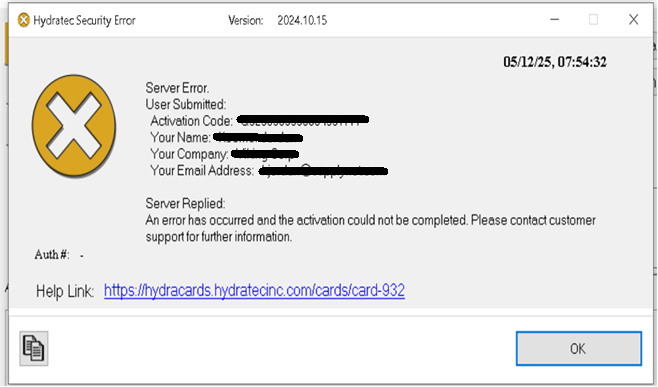
| Card 932 View | HydraKEY (Security and Licensing) | None | None | Security Error | Server Replied:
Server Replied: BAD;32503680000
Server Replied: “An error has occurred and the activation could not be completed.
Please contact customer support for further information.”
|
|
| Card 1390 View | HydraKEY (Security and Licensing) | Release (Subscription) | None | None | You get an error when opening or closing one of your Hydratec products that is using a Network Subscription for Authorization. If you have Logged out of HydraKEY while using it, you may get this error, in which case, you must log back in to get access to your product again. |
|
| Card 1389 View | HydraKEY (Security and Licensing) | Release (Subscription) | None | None | You get an error when opening or closing one of your Hydratec products that is using a Network Subscription for Authorization. If you have Logged out of HydraKEY while using it, you may get this error, in which case, you must log back in to get access to your product again. |
|
| Card 1388 View | HydraKEY (Security and Licensing) | Release (Subscription) | None | None | You get an error when opening or closing one of your Hydratec products that is using a Network Subscription for Authorization. If you have Logged out of HydraKEY while using it, you may get this error, in which case, you must log back in to get access to your product again. |
|
| Card 1386 View | HydraKEY (Security and Licensing) | Release (Subscription) | None | None | You get a strange error when closing one of your Hydratec products that is using a Network Subscription for Authorization. If you have Logged out of HydraKEY while using it, you may get this error, in which case, you must log back in to get access to your product again. |
|
| Card 1387 View | HydraKEY (Security and Licensing) | Release (Subscription) | None | None | You get a strange error when opening or closing one of your Hydratec products that is using a Network Subscription for Authorization. If you have Logged out of HydraKEY while using it, you may get this error, in which case, you must log back in to get access to your product again. |
|
| Card 1384 View | HydraCALC (Standalone) | None | None | Runtime 6 | When editing the cells, you receive the error Run-time error '6', Overflow
|
|
| Card 1385 View | HydraKEY (Security and Licensing) | Release (Subscription) | None | None | You get a strange error when closing one of your Hydratec products that is using a Network Subscription for Authorization. If you have Logged out of HydraKEY while using it, you may get this error, in which case, you must log back in to get access to your product again. |
|
| Card 926 View | HydraCALC (Standalone) | Calculate | Calculating | Message Box | Upon calculating a file, the error message, "Failed to launch C:\HES\Hydratec for revit\programs\calcdiagnose.exe" pops up.
Was preceeded by these messages;
Plus this; Number of Loops -1 and or Nodes with undesignated elevations
|
|
| Card 910 View | Piping (AutoCAD Based) | Riser Nipple Setup | None | Fatal Error | When trying to insert a riser nipple/vertical pipe, you get a FATAL ERROR: Unhandled Access Violation. 592A00h or 8B2A00h
|
|
| Card 1381 View | Standard (AutoCAD Based) | Grips | None | Slow | Customer reports that when trying to move an object by exposing the grips, the process takes a very long time and almost seems like AutoCAD freezes. "Clicking blocks and dragging by node, doing pipe sizings, etc..." |
|
| Card 1382 View | Display (AutoCAD Based) | None | None | None | Autocad seems "jumpy" and the screen occasionally flickers. Sometimes, an in-progress command will cancel out when the screen jumps |
|
| Card 1380 View | HydraKEY (Security and Licensing) | Release (Subscription) | None | None | Error Releasing Cloud Subscription from server: <A SPECIFIC ERROR WILL DISPLAY HERE>
|
|
| Card 1379 View | HydraKEY (Security and Licensing) | Release (Subscription) | None | None |
Released Cloud Subscription on server: (<SUBSIPTION NUMBER>) but failed to release it locally. This is likely due to decreased privleges to your registry on this machine. |
|
| Card 1378 View | HydraKEY (Security and Licensing) | Using | None | None |
Failed to paint the grid due to corrupt subscription Data. |
|
| Card 843 View | Head Selector (Standalone) | Open | None | Runtime Error |
|
|
| Card 316 View | Display (AutoCAD Based) | None | None | Missing Dialog Box | Command is run, but nothing appears to happen. May get Nil message
|
|
| Card 1377 View | HydraCAD (Revit Based) | Tag Pipes | None | Command Failure For External Command | Revit could not complete the external command... The 3D view ownerDBViewId is not locked
|
|
| Card 1376 View | HydraCALC (Revit Based) | Hydraulic Calculations | Continue | None | Error placing Reference Points or Demand Area annotation... The 3D view ownerDBViewId is not locked. |
|
| Card 1374 View | Installation (AutoCAD Based) | None | None | None | When trying to install HydraCAD, you get an error; HydraCAD Version 58 must be installed on this computer before running this update. Please download and install the full install of v58.
|
|