Your Quick Search:
"Insert Pump"
Software:
Total results: 115 (Closest matches are returned first)
Page:
* On smaller devices swipe left to view hidden table data
| Ribbon/Toolbar (software) | Button | Function | Error Type | Message | ||
|---|---|---|---|---|---|---|
| Ribbon/Toolbar (software) | Button | Function | Error Type | Message | ||
| Card 551 View | Build 3D Risers (AutoCAD Based) | Insert Pump | None | None | Extra line of input was entered into the VPUMP.DAT file found here; \HES\HydraCAD\Ver50\Programs\3DFTGS Unhandled Exception Insert Pump n/a |
|
| Card 1178 View | HydraCAD (Revit Based) | Insert Pump | Ok | None | No error, pump just doesn't insert |
|
| Card 1327 View | HydraCAD (Revit Based) | Insert Pump | None | Command Failure For External Command | Revit could not complete the external command... Name contains illegal characters
|
|
| Card 377 View | Build 3D Risers (AutoCAD Based) | Insert Pump | None | None | Discharge and or Suction inputs were typed in and not entered via the pull down. input new pump |
|
| Card 17 View | HydraCAD (Revit Based) | Insert Pump | None | None | Pump is in water supply but no reference point PI |
|
| Card 1042 View | HydraCAD (Revit Based) | Insert Pump | None | Command Failure For External Command | Command Failure for External Command... ...System.IO.DirectoryNotFoundException
|
|
| Card 28 View | HydraCAD (Revit Based) | Insert Pump | Ok | Command Failure For External Command | Revit could not complete the external command.... Details: Name must be unique... At HCAD_Revit_Tools.CAD3.Insert_Pump.Go |
|
| Card 18 View | HydraCAD (Revit Based) | Insert Pump | None | Runtime Error | Runtime Error 62: Input past end of file |
|
| Card 804 View | HydraCALC (Standalone) | Insert Fittings | Name | File To Load Paths And Dirs. | After running an update to 50.54, user is getting this error when trying to add a fitting by right-clicking the fittings cell, a dialog box pops up saying, May happen with Pipe Schedule and adding a Pump as well. File to load paths and Dirs.(AND STRING CONVERSION) |
|
| Card 1483 View | HydraCAD (Revit Based) | Hangers | Brace | None | When trying to use the Hangers tool, and insert a Brace, it only allows for a single brace to be added. |
|
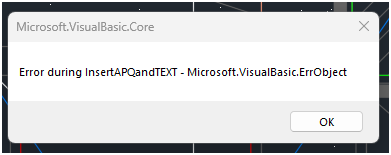
| Card 330 View | Calculations (AutoCAD Based) | Figure Head Area | None | None | When using the Figure Head Area tool, you get this error
Error during APQ insert - Microsoft VisualBasic ErrObject Error during LoadAPQFile - eFileNotFound Error during InsertAPQandTEXT |
|
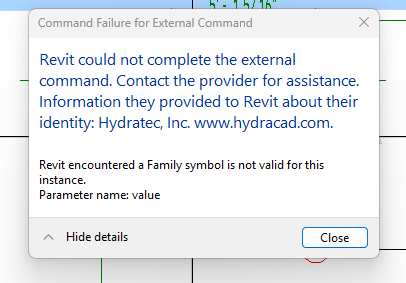
| Card 1464 View | HydraCAD (Revit Based) | Spacing and Layout | Insert Sprinklers | Command Failure For External Command | Revit could not complete the external command... Family symbol is not valid for this instance
|
|
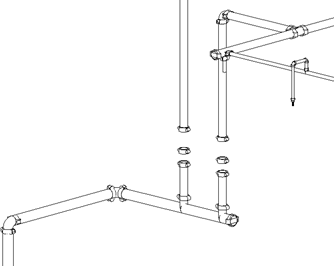
| Card 1456 View | HydraCAD (Revit Based) | Add Device | None | None | After inserting a valve, it does not appear in the 3D view. There is blank space where the valves should be.
|
|
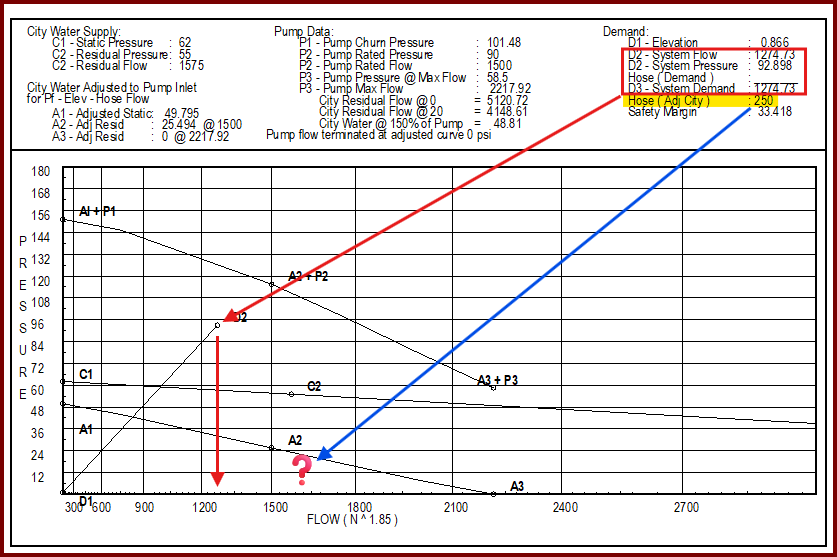
| Card 1406 View | HydraCALC (Standalone) | Print Final | None | When printing final, your outside hose demand after the pump isn't included in the total flow.
In the example above, the system demand is 1274 gpm is represented by point D2/D3. The outside hose adds up to another 250 gpm but there isn't another marker at 1524 gpm *Please note, while the Demand summary at the top shows D3 as a point, since D2 and D3 are the same value, the graph will only show point D2. |
||
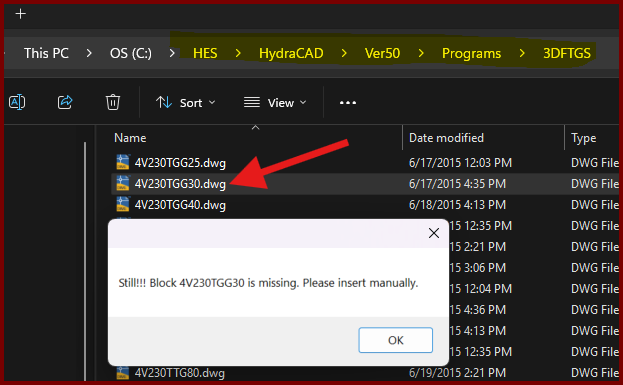
| Card 1437 View | Build 3D Risers (AutoCAD Based) | Insert Fitting Via Parts Tree | None | Block Is Missing | When trying to insert a valve type fitting from the parts tree, you get the error; Still!!! Block ### is missing. Please insert manually.
However checking the database for the drawing file shows it exists. |
|
| Card 1455 View | Dimensions (AutoCAD Based) | None | None | None | All building dimensions are inserted into an different layer than the current one. |
|
| Card 392 View | Couplings (AutoCAD Based) | Insert Couplings | None | None | No error message but cutting in couplings breaks the pipe but does not insert the couplings block. |
|
| Card 276 View | 3D Modeling (AutoCAD Based) | Check Elevation | None | None | TOS block looks odd or has unusual insertion point or text is placed far away |
|
| Card 1158 View | 3D Modeling (AutoCAD Based) | Check Elevation | None | None | Elevation Check: Bad Defline(s) Corrupt TOS deflines detected Erase and re-insert any deflines with yellow circles at its ends then try again
FATAL ERROR Unhandled Access Violation Reading 0x0000 Exception at 3BC2E053h
|
|
| Card 1396 View | Listing (AutoCAD Based) | New Tag | None | Invalid Color Number | When inserting a listing tag on a pipe, you get the error, "Invalid color number"
|
|
Page: