All Cards
* On smaller devices swipe left to view hidden table data
| Ribbon/Toolbar (Software) | Button | Function | Error Type | Description | ||
|---|---|---|---|---|---|---|
| Ribbon/Toolbar (Software) | Button | Function | Error Type | Description | ||
| Card 1340 View | HydraLIST (Standalone) | Sizing | None | None | Cannot get HydraLIST to print out pipe sketches with 1/8" units |
|
| Card 1339 View | HydraCALC (Standalone) | Calculation Process | None | None | Dup Equiv K / Sys Pipe Node |
|
| Card 1338 View | HydraCALC (Revit Based) | Select Remote Area | None | None | Edit Remote Area dialog box is cut off (Can also happen to the main HydraCALC for Revit Setup dialog box)
|
|
| Card 1337 View | HydraCALC (Revit Based) | Hydraulic Calculations | Return To Revit | None | Hydraulic Calculations runs, the Calc Process finishes, but no nodes are placed and a HydraCALC file isn’t created. Can also hang as step 2.3, depending on program version.
|
|
| Card 1336 View | Sprinklers (AutoCAD Based) | Head Schedule | None | Bad Argument | When trying to insert a Sprinkler Head Schedule (SHS command), after viewing the setup dialog box, then selecting sprinkler heads, when asked to select a location for the guide, you get the error; Please pick start point for schedule Error: bad argument value: non-negative: -1
|
|
| Card 1335 View | HydraCALC (Revit Based) | Hydraulic Calculations | Continue | None | Calc process gets stuck on step 5a.3
|
|
| Card 1334 View | HydraCALC (Revit Based) | Hydraulic Calculations | Continue | None | Calc stops at step 2.2a, also creates Run-time error 5
|
|
| Card 1333 View | HydraCALC (Revit Based) | Hydraulic Calculations | Continue | None | Calc process gets stuck on step 5a.3b
|
|
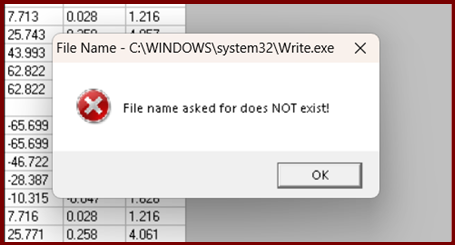
| Card 1332 View | HydraCALC (Standalone) | Calculate | Calculation Results | None | The View button that appears after running a calculation does not do anything
Or you get the error; C:\Windows\system32\Write.exe 'file name asked for does not exist!
|
|
| Card 1331 View | HydraCAD (Revit Based) | Add Device | Opening | No Error. Wont Open Uponn Selecting | Valve selector unable to open in Revit Beta Ver 25.1.003 |
|
| Card 1330 View | HydraCAD (Revit Based) | Configure Head | Connect Head | None | No error, but when trying to connect a sprinkler to a pipe, connect head does not let you select a sprinkler |
|
| Card 1329 View | HydraCALC (Revit Based) | Hydraulic Calculations | Continue | None | Error when attempting to make a fluid delivery time file...
|
|
| Card 1328 View | HydraCALC (Revit Based) | Hydraulic Calculations | Continue | Runtime Error | Run-time Error 5.... Hangs at Step 2.4c (Could also be Step 1a.9 or 2.3)
|
|
| Card 1327 View | HydraCAD (Revit Based) | Insert Pump | None | Command Failure For External Command | Revit could not complete the external command... Name contains illegal characters
|
|
| Card 1326 View | HydraCALC (Revit Based) | Hydraulic Calculations | None | None | System flow demand exceeds the maximum rated flow...
|
|
| Card 1325 View | HydraCAD (Revit Based) | Import Clashes | None | Command Failure For External Command | Command Failure for External Command... The symbol is not active
|
|
| Card 1324 View | HydraCAD (Revit Based) | Find Clashes | None | None | Command Failure for External Command... Category of the element is not supported for element intersection filters
|
|
| Card 1323 View | HydraCAD (Revit Based) | Find Clashes | None | Command Failure For External Command | Command Failure for External Command... The symbol is not active
|
|
| Card 1322 View | HydraLIST (Revit Based) | Auto Stocklist | None | None | Yellow part numbers that do not list once you return to Revit
|
|
| Card 1321 View | Calculations (AutoCAD Based) | Start Autocalcs | None | Hcad_Env.Ini Error | Keyboard alias "SAC" After clicking OK in the AutoCalc Setup window and just before the process begins, you get the following error messages;
Problem updating your Hcad_env.ini file. /n Will try to rebuild file. /r Pick OK then Restart AutoCALC Your Hcad_env.ini file is possibly corrupted. This calc will not continue |
|
Page: