Advanced Search
Total results: 1338
* On smaller devices swipe left to view hidden table data
| Ribbon/Toolbar (software) | Button | Function | Error Type | Description | ||
|---|---|---|---|---|---|---|
| Ribbon/Toolbar (software) | Button | Function | Error Type | Description | ||
| Card 176 View | Listing (AutoCAD Based) | Start Autolist | None | Failed To Launch |
"AutoLIST Failed!... Please run Listing CheckUps"
This message is shown when running the AutoLIST process, but checkups didn't find any errors AutoLIST Failed |
|
| Card 74 View | Calculations (AutoCAD Based) | Start Autocalcs | None | None | Step 2.3 - After one pass through calculations Miscfunc hangs.... Also possibly "Hydraulic Engine not responding" and a "Runtime Error 62 input past end of file" |
|
| Card 71 View | Calculations (AutoCAD Based) | Start Autocalcs | None | None | When starting AutoCALC, it stops in the v50 Fuel Gauge at step 1a.4 - Calculating Total Lengths. Working on the pipe from node #### to node #### with a fitting string of ...
May be followed by a Runtime Error 13 or Runtime Error 5 |
|
| Card 1461 View | Launching HydraCAD (AutoCAD Based) | None | None | Crash | Launching AutoCAD causes a hard system crash as it loads some HydraCAD
plugins, the last one seen is HCADMainBase.arx. The machine
crashes every time — it does not reach the AutoCAD interface. When HydraCAD is
uninstalled, AutoCAD launches and runs normally with no crashes. |
|
| Card 1015 View | All products (Security and Licensing) | None | None | Security Error | You are not currently authorized to use this Hydratec Product. Lack of authorization.
|
|
| Card 1458 View | HydraCAD (Revit Based) | Hangers | None | None | When placing clevis hangers or adjustable ring hangers on a 10-inch pipe drawing in Revit, the hangers render incorrectly with missing 5/8 rods. |
|
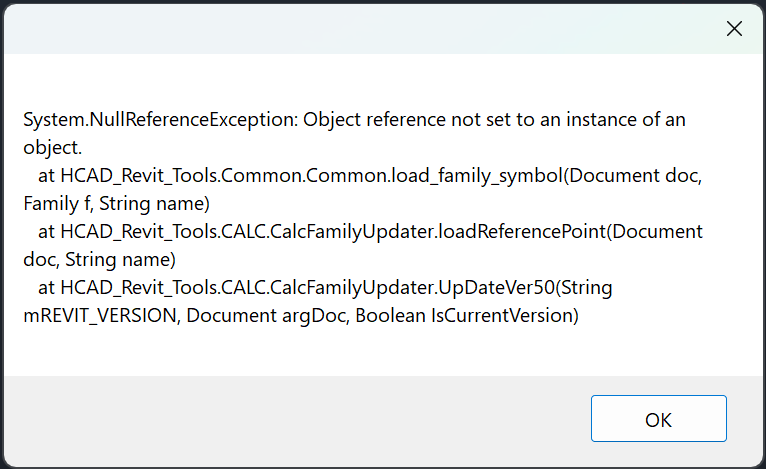
| Card 1457 View | HydraCALC (Revit Based) | All Ref Points | None | System.Nullreferenceexception: | When trying to add reference points, none are added and this error shows:
|
|
| Card 1300 View | HydraCAD (Revit Based) | Spacing and Layout | Insert Sprinklers | Command Failure For External Command | Revit could not complete the external command... Object Reference not set to an instance of an object.
|
|
| Card 1068 View | HydraCAD (Revit Based) | Hangers | Dialog Box | None | Hanger Assembly dropdown list is incomplete.
|
|
| Card 1456 View | HydraCAD (Revit Based) | Add Device | None | None | After inserting a valve, it does not appear in the 3D view. There is blank space where the valves should be.
|
|