All Cards
* On smaller devices swipe left to view hidden table data
| Ribbon/Toolbar (Software) | Button | Function | Error Type | Description | ||
|---|---|---|---|---|---|---|
| Ribbon/Toolbar (Software) | Button | Function | Error Type | Description | ||
| Card 1276 View | Entitlement (Security and Licensing) | None | None | Fingerprint | When attempting to activate an Entitlement you get the error; System,Net.WebException: The remote server returned an error: (400)
|
|
| Card 1275 View | HydraKEY (Security and Licensing) | Log Out (Subscription) | None | None |
Unable to contact our servers to Log you out. Your subscriptions are still intact on this machine. It is neccessary to contact the server to release your subscriptions for use elsewhere. |
|
| Card 1274 View | Installation (AutoCAD Based) | Hydra_DAO_Install.EXE | None | Error 1935 | When trying to install the Hydra_DAO_Install.exe based on this HydraCARD; https://hydracards.hydratecinc.com/cards/card-864 You get this error;
Microsoft Visual C++ 2008 Redistributable Setup 0x80070005
Followed by this one;
An error occurred during setup Installation failed. |
|
| Card 1273 View | Launching HydraCAD (AutoCAD Based) | Opening | None | None | When opening HydraCAD, you get this error message or something similar;
AutoCAD Warning The following shortcuts in the search were invalid and ignored:
After clicking OK, HydraCAD will open up, albeit very slowly, and almost every step will take an significant amount of time, for example 45 seconds to start a new drawing or to size a pipe
|
|
| Card 1272 View | 3D Modeling (AutoCAD Based) | Show Model Errors | None | Crash | When raising to 3D, AutoCAD crashes with no error, no warning, it just closes. You can test this by closing all open drawings then starting a new drawing using the Hydratec template, "Hydracad Imperial Default". Draw one pipe 10' long (LN command). Place a length & 2" diameter on it (SZP command) Place a 10' AFF elevation mark on it (AFF command) Start the process of raising to 3D (S3D command). It will then crash out without warning around step 2 (something about sprinkler heads). |
|
| Card 1271 View | View (Revit Based) | None | None | None | [Done] This is NOT for a HYDRACARD. It is a request for additional tags for a Helpful Video |
|
| Card 1270 View | View (Revit Based) | 3D View | None | None | This is NOT an error card. It is a request for a helpful video! |
|
| Card 1269 View | HydraCAD (Revit Based) | Spacing and Layout | Insert Sprinklers | None | No Error given but Pipes look like theyy are missing after program completion.
|
|
| Card 1268 View | HydraCAD (Revit Based) | Configure Head | Connect Head | None | No Error given but Pipes look like theyy are missing after program completion.
|
|
| Card 1266 View | Calculations (AutoCAD Based) | Start Autocalcs | Show Flowing Paths | None | Flowing Paths dialog box is empty. |
|
| Card 1265 View | HydraCAD (Revit Based) | Add Device | Select | None |
|
|
| Card 1264 View | HydraKEY (Security and Licensing) | Refresh HydraKEY Info Button | None | None |
Error Getting Available Subscriptions during refresh or while repopulating the HydraKEY dialogue. |
|
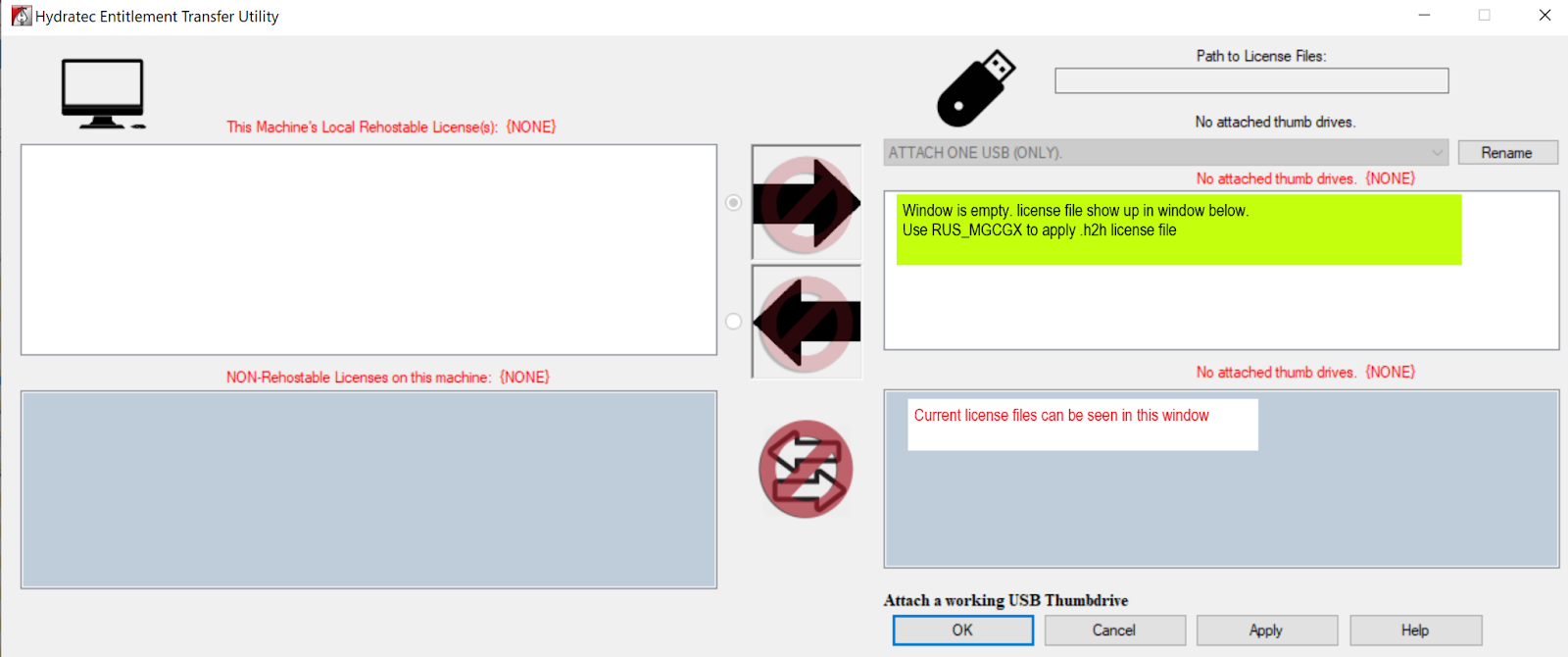
| Card 1263 View | Entitlement (Security and Licensing) | USB Transfer | None | None | When trying to transfer an Entitlement using the Hydratec Entitlement Transfer Utility ("C:\HES\Common\Entitlement Transfer\HydraEntitlementTransfer.exe") , after plugging in the USB to the "new" computer, you can't see a license to transfer.
The recipient does not show up the the window for licenses available to move (top right), but are visible in the bottom right window.
|
|
| Card 1262 View | HydraCAD (Revit Based) | Hangers | None | None | [Done] DON'T DELETE THIS ONE YET!!!! The helpful videos for search of SEISMIC has a matching pdf and mp4. The pdf MUST become an easy access from the help for Hangers.
This HydraCARD should be deleted once the help file has been updated |
|
| Card 1261 View | HydraCAD (Revit Based) | Cleanup Tags | None | None |
|
|
| Card 1260 View | HydraKEY (Security and Licensing) | Opening | None | Failed To Launch | When trying to open HydraKEY, you see the spash screen, but it eventually times out and the application does not open
|
|
| Card 1259 View | Piping (AutoCAD Based) | Rapid Main | None | Fatal Error | When using Rapid Main or Rapid Line, clicking on the pipe causes a Fatal Error |
|
| Card 1258 View | HydraCALC (Standalone) | Print Final | None | When printing final, you get this error message "Error during Cover Sheet print, possibly due to missing .DAT file"
|
||
| Card 1257 View | HydraKEY (Security and Licensing) | Using | None | Security Error |
Failure to make conversion for Subscription.(1) |
|
| Card 1256 View | HydraKEY (Security and Licensing) | Using | None | Security Error |
There is an issue with your Subscription ID.(1) |
|
Page: