Advanced Search
Total results: 1338
* On smaller devices swipe left to view hidden table data
| Ribbon/Toolbar (software) | Button | Function | Error Type | Description | ||
|---|---|---|---|---|---|---|
| Ribbon/Toolbar (software) | Button | Function | Error Type | Description | ||
| Card 847 View | Launching HydraCAD (AutoCAD Based) | Save | None | Other | Trying the SAVE or QSAVE or SAVE AS command in AutoCAD fails "One or more objects in this drawing cannot be saved to the specified format. The operation was not completed and no file was created."
|
|
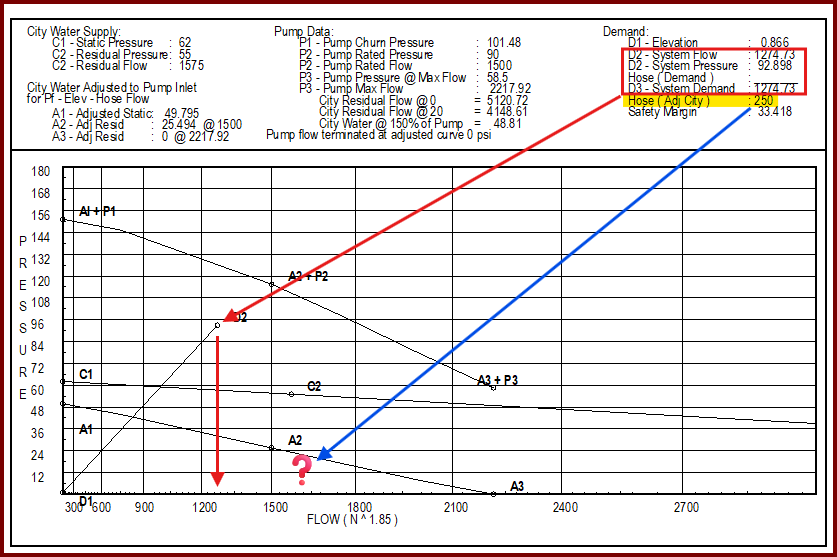
| Card 1406 View | HydraCALC (Standalone) | Print Final | None | When printing final, your outside hose demand after the pump isn't included in the total flow.
In the example above, the system demand is 1274 gpm is represented by point D2/D3. The outside hose adds up to another 250 gpm but there isn't another marker at 1524 gpm *Please note, while the Demand summary at the top shows D3 as a point, since D2 and D3 are the same value, the graph will only show point D2. |
||
| Card 660 View | HydraCALC (Standalone) | Calculate | Calculating | Process Error | Primary calc results are shown, and when selecting OK to continue back to the calc input screen, the two messages below are displayed, twice;
"The designated source node was not found in the list of pipes" OK "Calculation failed for an unknown reason" OK Process Error Hydcalc |
|
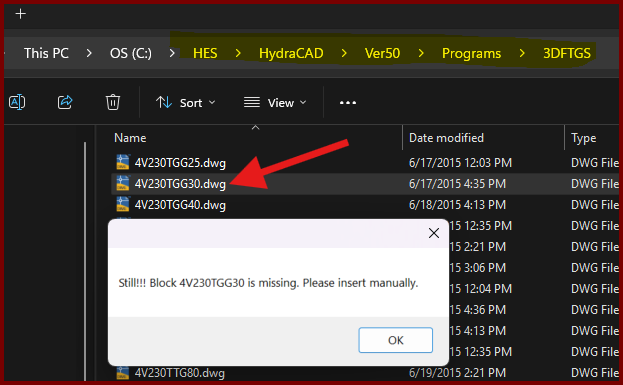
| Card 1437 View | Build 3D Risers (AutoCAD Based) | Insert Fitting Via Parts Tree | None | Block Is Missing | When trying to insert a valve type fitting from the parts tree, you get the error; Still!!! Block ### is missing. Please insert manually.
However checking the database for the drawing file shows it exists. |
|
| Card 1455 View | Dimensions (AutoCAD Based) | None | None | None | All building dimensions are inserted into an different layer than the current one. |
|
| Card 545 View | Piping (AutoCAD Based) | Auto Line | None | No Connectable Heads | No connectable heads found within distance specified for the line illustrated, or heads were already connected ...
No connectable heads message comes up, even when there are obviously heads that can be connected. Can also be error stating Please re-select line away from other lines |
|
| Card 1454 View | Collaborate (AutoCAD Based) | Navisworks Toolkit | Export Piping To Navis | Properties Do Not Appear In Navis | In Navisworks 2024.2 to Navisworks 2025.3 (possibly a sub-version earlier or later), Properties for appended HydraCAD persistent models do not appear, and a Proxy Object notice is given. |
|
| Card 1067 View | Launching HydraCAD (AutoCAD Based) | Opening | None | Unhandled Exception | When opening HydraCAD, you get this error
Unhandled Exception...DAO32Server...
|
|
| Card 969 View | HydraLIST (Revit Based) | None | None | None | HydraLIST ribbon is missing in the Revit toolbar when opening a project file.
|
|
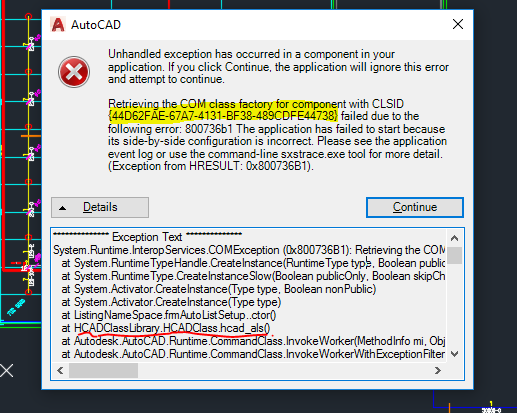
| Card 864 View | Launching HydraCAD (AutoCAD Based) | None | None | Unhandled Exception | When Opening HydraCAD or trying to list a drawing, you recieve any Error containing the following CLSID: 44D62FAE-67A7-4131-BF38-489CDFE44738
Or any of the following HRESULT error numbers: 0x800736B1
0x80040154
0x80070002
0x80080005
0x80029C4A TYPE_E_CANTLOADLIBRARY
|
|