Advanced Search
Total results: 1338
* On smaller devices swipe left to view hidden table data
| Ribbon/Toolbar (software) | Button | Function | Error Type | Description | ||
|---|---|---|---|---|---|---|
| Ribbon/Toolbar (software) | Button | Function | Error Type | Description | ||
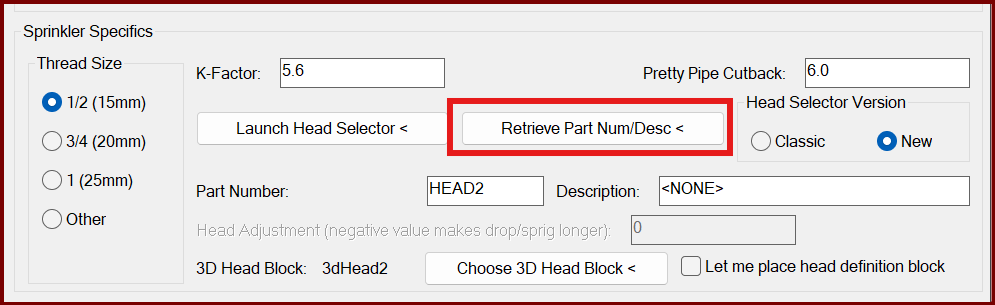
| Card 1411 View | Sprinklers (AutoCAD Based) | Select Sprinkler | Head Selector | Bad Argument | When selecting "Retrieve Part Num/Desc <" from the sprinkler Block Definition window, you get the error; Error: bad argument type: stringp nil
|
|
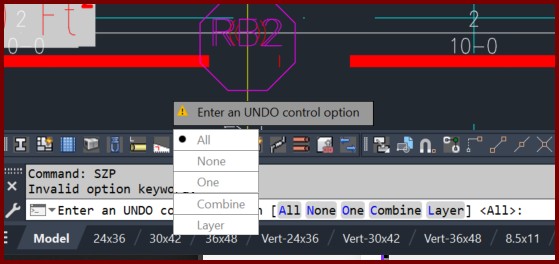
| Card 1410 View | Piping (AutoCAD Based) | Size Pipe Setup | None | None | When attempting to insert a pipe dimension you get the error "Invalid option keyword"
And the command prompt says "Enter an UNDO control option" with the dialog showing your choices |
|
| Card 1180 View | Cleanup (AutoCAD Based) | Draw Pretty Pipes | None | Unhandled Exception | When starting the Pretty Pipes command, you get an Unhandled Exception error including 'Could not find a part of the path'
Another error may mention blockoffsets.dat
|
|
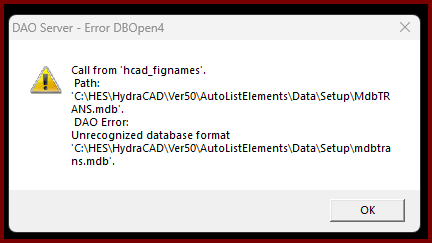
| Card 1409 View | Opening a Drawing (AutoCAD Based) | None | None | Dao Server | When trying to open a drawing file, you get this error;
DAO Server - Error DBOpen4 Call from 'hcad_fignames'. Path:'C:\HES\HydraCAD\Ver50\AutoListElements\Data\Setup\MdbTRANS.mdb' DAO Error: Unrecognized database format C:\HES\HydraCAD\Ver50\AutoListElements\Data\Setup\mdbtrans.mdb' When you click OK, AutoCAD crashes out |
|
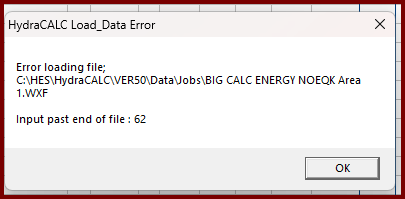
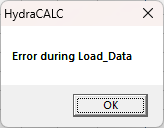
| Card 1408 View | HydraCALC (Standalone) | Open | Runtime 62 | None | When re-opening a calc file generated by Hcad for Revit, you get a Runtime-error 62, Input past end of file
Followed by an 'error during load_data' message.
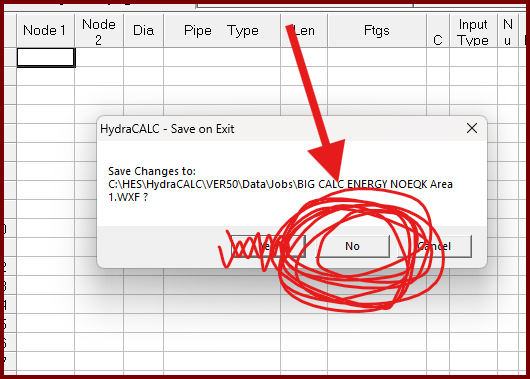
NOTE: After clicking OK, the job will open to blank data. Close the file. DO NOT CLICK 'YES' TO SAVE YOUR DATA otherwise you will lose all your data and there is no way to recover it.
|
|
| Card 1047 View | Opening a Drawing (AutoCAD Based) | None | None | None | Drawing looks strange, piping looks hollow and sprinkler heads a little off and Acad background looks greyish/grayish.
Drawing also seems to lag when panning, processes take longer
|
|
| Card 1048 View | HydraCALC (Standalone) | Open | None | Runtime Error | When trying to open HydraCALC, you get Run-time error 9 - Subscript out of range
|
|
| Card 1081 View | 3D Modeling (AutoCAD Based) | Show System Model | None | Please Switch To System Model | When attempting to create a 3D model, you get the error; Please switch to System Model to Annotate Drops and Sprigs plus System.NullReferenceException: Object reference not set to an instance of an object at HCADexports.RevitConversion.create_hydrapipes_from_db() at HCADexports.RevitConversion.create_hydrafittings_from_db(List'1 pipes, List'1 heads)
|
|
| Card 854 View | Listing (AutoCAD Based) | Start Autolist | None | Hydracad Error | When starting the AutoLIST process, the message box shown below pops up. The process "pretends" to continue through, but when HydraLIST opens, it's completely blank.
Re-run Autolist with the drawing starting on the ground. Current run will not include any FSC information in the MISC tab in HydraList. |
|
| Card 922 View | HydraCALC (Standalone) | Info Sheet | None | When viewing the final calc printout, the info sheet shows the line, text1(35) - invisible
|
||