AutoCAD Based Cards
Total: 726
* On smaller devices swipe left to view hidden table data
| Ribbon/Toolbar (Software) | Button | Function | Error Type | Description | ||
|---|---|---|---|---|---|---|
| Ribbon/Toolbar (Software) | Button | Function | Error Type | Description | ||
| Card 846 View | Calculations (AutoCAD Based) | Start Autocalcs | Calc Area # | J19380 | Just after starting the Autocalc Settings, the dialog box as shown below pops up and the process stops.
Something went wrong! Error Code J19380 |
|
| Card 840 View | Calculations (AutoCAD Based) | Start Autocalcs | Finish Area | None | AutoCALC is creating extra node points where there shouldn't be. In the image below, node 45 shouldn't be created as there's neither a flowing head nor a change in diameter at that point.
'extra node' 'extra ref point' 'extra reference point' 'refpt' |
|
| Card 831 View | Calculations (AutoCAD Based) | Start Autocalcs | None | Runtime Error | Caclulating Total Lengths... Runtime Error "13" Type mis-match |
|
| Card 138 View | Calculations (AutoCAD Based) | Start Autocalcs | Calc Area # | Missing File |
File name asked for does NOT exist FitExch.dat 1.a.1 |
|
| Card 74 View | Calculations (AutoCAD Based) | Start Autocalcs | None | None | Step 2.3 - After one pass through calculations Miscfunc hangs.... Also possibly "Hydraulic Engine not responding" and a "Runtime Error 62 input past end of file" |
|
| Card 71 View | Calculations (AutoCAD Based) | Start Autocalcs | None | None | When starting AutoCALC, it stops in the v50 Fuel Gauge at step 1a.4 - Calculating Total Lengths. Working on the pipe from node #### to node #### with a fitting string of ...
May be followed by a Runtime Error 13 or Runtime Error 5 |
|
| Card 135 View | Calculations (AutoCAD Based) | Start Autocalcs | None | None | During the AutoCALC process, it gets hung up at step 5a.3b. Re-Ordering Pipe Paths - Phase 2
|
|
| Card 92 View | Calculations (AutoCAD Based) | Start Autocalcs | None | None | Step 1a.3 - Fitting Exchange No replacement fitting name for 22E for Sched-10 Note: This could be any fitting or pipe type described in the error. If you click ok at each error, the process will run through without these fittings |
|
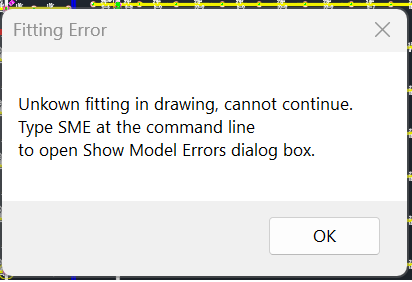
| Card 41 View | Calculations (AutoCAD Based) | Start Autocalcs | None | None | Unkown (sic) Unknown fitting in drawing, cannot continue Type SME at the command line to open 'Show Model Errors' dialog box
|
|
| Card 107 View | Calculations (AutoCAD Based) | Start Autocalcs | None | None | Step 5a.3 "Attaching Elevation of ~ to Node ~~~~ Step 5a.3 "Calculating" "The specified remote node does not have a k-factor. Please fix your input." "Calculation failed for unknown reason"
|
|