Advanced Search
Total results: 1338
* On smaller devices swipe left to view hidden table data
| Ribbon/Toolbar (software) | Button | Function | Error Type | Description | ||
|---|---|---|---|---|---|---|
| Ribbon/Toolbar (software) | Button | Function | Error Type | Description | ||
| Card 1206 View | Calculations (AutoCAD Based) | Start Autocalcs | None | Freezes | When running the AutoCALC process, it hangs at step 2.4e "Re-Loading Calculated Data - AutoPeaking Data" May also happen around steps 2.3, 2.4a, 2.4b, 2.4c, and 2.4d
|
|
| Card 1441 View | Installation (Revit Based) | None | None | None | Using HydraCAD buttons cause errors like Loading Shared Parameters for Pipes Failed.... |
|
| Card 1477 View | Launching HydraCAD (AutoCAD Based) | None | None | None | Windows 11 Smart App Control is blocking HCADLoader.arx because Windows says it cannot confirm who published the file. HydraCAD then gives Security Error and fails to load its functions. |
|
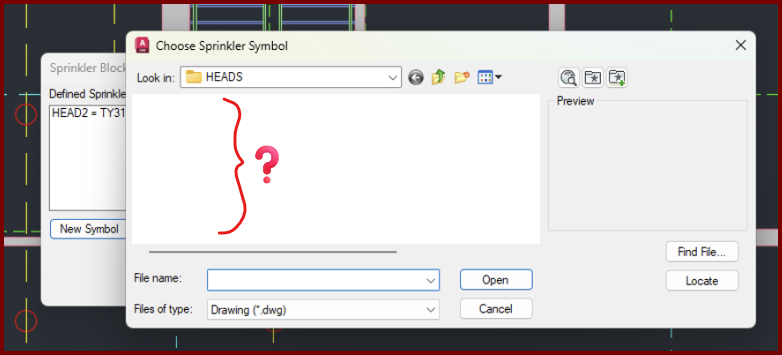
| Card 1471 View | Sprinklers (AutoCAD Based) | Select Sprinkler | Choose Head Symbol | Crash | When setting up a new head, the dialog that displays the head symbols to be selected appears, is empty, and then drawing crashes,
|
|
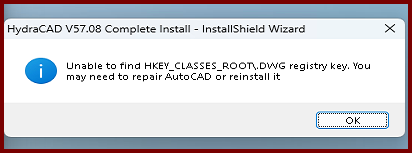
| Card 1476 View | Installation (AutoCAD Based) | None | None | None | During the HydraCAD install, you get an error saying, "InstallShield Wizard - Unable to find HKEY_CLASSES_ROOT\.DWG registry key. You may need to repair AutoCAD or reinstall it
|
|
| Card 463 View | Launching HydraCAD (AutoCAD Based) | None | None | None | 1. Missing profile 2. Bad registry entry 3. User does not have Admin privileges Unable to find profile Installation Acad 2015~ |
|
| Card 1153 View | Persistent Model (AutoCAD Based) | Navis Model | None | None | When importing a Persistent Model into Revizto, none of the riser nipples are visible |
|
| Card 907 View | Installation (AutoCAD Based) | None | None | Registry Problem | During the install of HydraCAD V56/57/58, the user is greeted with the message below. Following the both sets of instructions of opening and closing AutoCAD, and running a repair of AutoCAD do not make a difference. You'll still get the error message. V56 = R23.X
V57 install will say; Neither AutoCAD 2021, 2022, 2023 nor 2024 found (missing registry key: HKEY_CURRENT_USER\Software\Autodesk\AutoCAD\R24.X). Please install it before re-running this install
|
|
| Card 260 View | Launching HydraCAD (AutoCAD Based) | None | None | Security Error | When opening HydraCAD, you only receive this error message and not a HydraKEY error with the golden X. If you receive a HydraKEY error, search for the linked HydraCARD in that message box as it takes priority.
Security Error: One of the following conditions is possible HydraCAD is unable to function under these conditions.
After AutoCAD opens, press F2 to view the command prompt, see if the text below appears. If yes, see solution 1. Could not find file HCAD_ENV.INI Is 2024; error: no function definition: PRINTEM
|
|
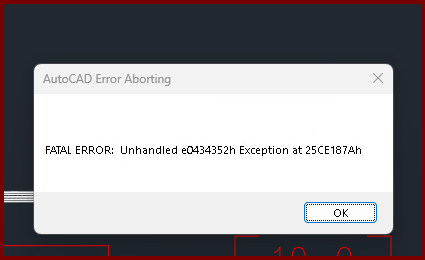
| Card 1473 View | Listing (AutoCAD Based) | Start Autolist | Freezes | Crash | When the OK button is clicked from the AutoLIST Setup window, it'll either hang/freeze or crash with a Fatal Error
Unhandled e0434352h Exception at 25CE17Ah |
|