Advanced Search
Total results: 1338
* On smaller devices swipe left to view hidden table data
| Ribbon/Toolbar (software) | Button | Function | Error Type | Description | ||
|---|---|---|---|---|---|---|
| Ribbon/Toolbar (software) | Button | Function | Error Type | Description | ||
| Card 908 View | HydraCALC (Standalone) | None | None | Runtime Error | Trying run a calculation as stand-alone, or via AutoCAD/AutoCALC or Revit/AutoCALC, you get this error message;
Run-time error 339: Runtime error 339 Runtime 339 It's likely a job without a pump works, but one with a pump crashes |
|
| Card 1229 View | HydraCAD (Revit Based) | Tag Pipes | None | Command Failure For External Command | Command Failure for External Command... Revit could not complete the external command.
|
|
| Card 1264 View | HydraKEY (Security and Licensing) | Refresh HydraKEY Info Button | None | None |
Error Getting Available Subscriptions during refresh or while repopulating the HydraKEY dialogue. |
|
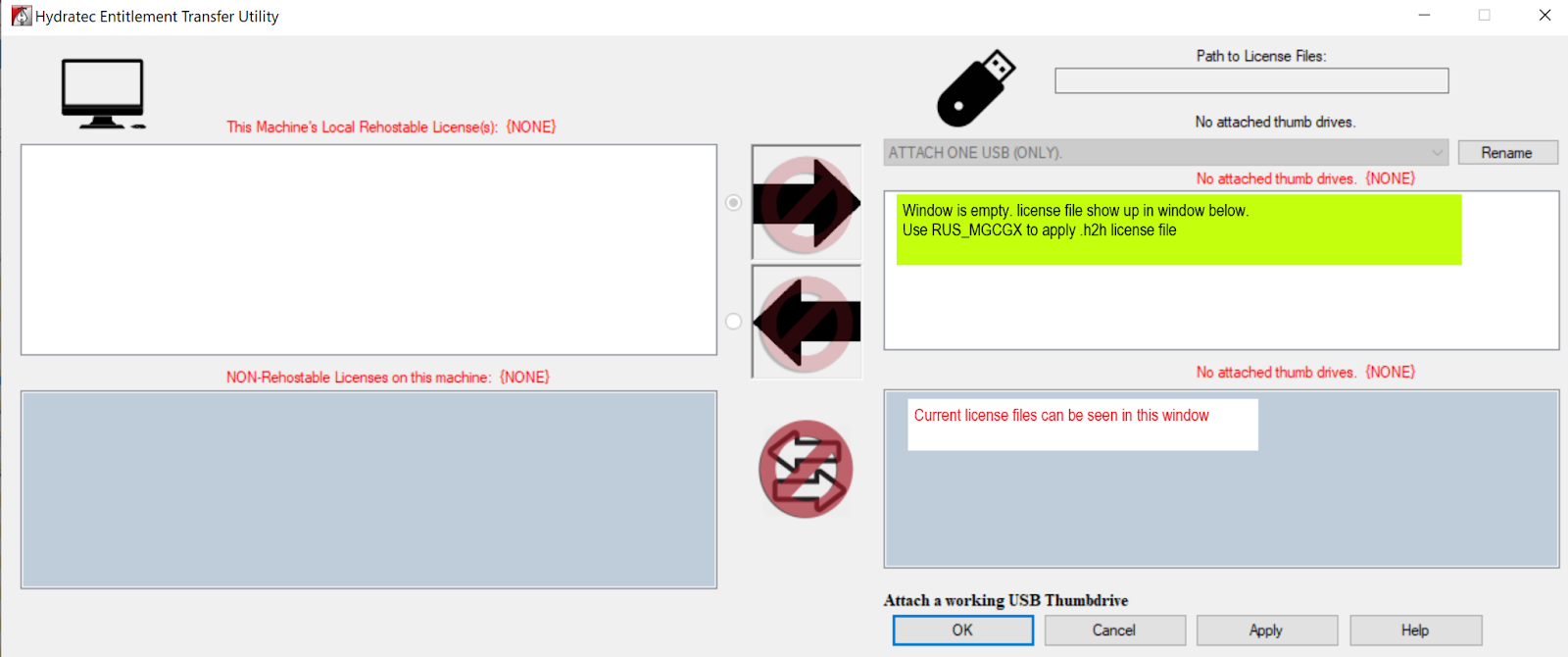
| Card 1263 View | Entitlement (Security and Licensing) | USB Transfer | None | None | When trying to transfer an Entitlement using the Hydratec Entitlement Transfer Utility ("C:\HES\Common\Entitlement Transfer\HydraEntitlementTransfer.exe") , after plugging in the USB to the "new" computer, you can't see a license to transfer.
The recipient does not show up the the window for licenses available to move (top right), but are visible in the bottom right window.
|
|
| Card 116 View | Listing (AutoCAD Based) | Listing Check Ups | None | Unhandled Exception | When attempting to run AutoLIST checkups and selecting a boundary, user gets an error similar to the one below; [Exception in fs_util.arx ARX Command] Unhandled Exception C00000005 (Access Violation Writing 0x9485ad10) at address 7720F86h OR Unhandled Exception in FS_UTIL.ARX and/or ADS request. |
|
| Card 177 View | Listing (AutoCAD Based) | Start Autolist | None | None | Field is too small to accept the amount of data you attempted to add. Try inserting or pasting less data. Runtime Error |
|
| Card 476 View | Collaborate (AutoCAD Based) | Navisworks Toolkit | Export Piping To Navis | None | When in the Pipe Model Settings window (Setup window in Navis toolkit), the user cleared the text box for "Layer Name prefix" Dialog Box Acad 2016+ |
|
| Card 460 View | 3D Modeling (AutoCAD Based) | Show System Model | None | None | Unknown n/a Pipe diameters 53+ |
|
| Card 182 View | Listing (AutoCAD Based) | Start Autolist | None | None | Run-time error 70 Permission denied Runtime Error 70 |
|
| Card 293 View | Hangers (AutoCAD Based) | Insert One Hanger | None | None | ??? Connection Failed listing tags |
|