Standalone Cards
Total: 279
* On smaller devices swipe left to view hidden table data
| Ribbon/Toolbar (Software) | Button | Function | Error Type | Description | ||
|---|---|---|---|---|---|---|
| Ribbon/Toolbar (Software) | Button | Function | Error Type | Description | ||
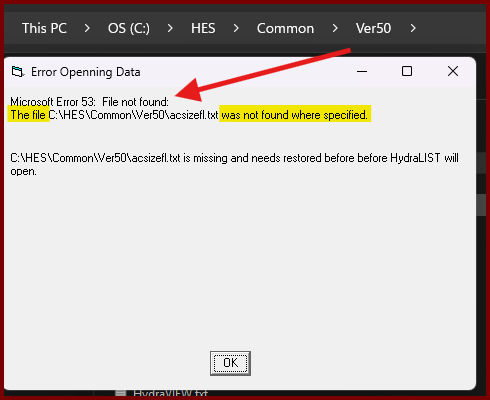
| Card 1429 View | HydraLIST (Standalone) | Open | Opening | Error 53 | When attempting to open HydraLIST after a fresh install, you get the error; [[ Error Openning (sic) Data ]] Microsoft Error 53: File not found The file ??? was not found where specified "filenamehere is missing and needs restored before before HydraLIST will open" 🤦
|
|
| Card 1427 View | HydraLIST (Standalone) | Process | None | None | When processing a stock list, the SldReports window reports, "could not find part number for the given pipe type" Move the window to reveal the Processing Reports window where you'll see which section ID it's having problems with
Clicking OK will report others with similar issues, the process will not complete. |
|
| Card 1349 View | HydraLIST (Standalone) | None | None | None | Yellow part numbers that do not list
|
|
| Card 1347 View | HydraLIST (Standalone) | Save | None | None | When saving the file, no hvuf file gets created, and run-time error 3021 appears
|
|
| Card 1340 View | HydraLIST (Standalone) | Sizing | None | None | Cannot get HydraLIST to print out pipe sketches with 1/8" units |
|
| Card 1297 View | HydraLIST (Standalone) | HydraLIST Wizard | None | None | When accessing a HydraLIST wizard, this error appears:
|
|
| Card 1277 View | HydraLIST (Standalone) | Process | Total Weight | None | After processing a stock list, the Total weight value displays as -999.0000
|
|
| Card 1217 View | HydraLIST (Standalone) | Open | Opening | None | When opening HydraVIEW as stand-alone, via HydraCALC or via HydraLIST, nothing happens. 1. Its icon is NOT in the taskbar 2. HydraVIEW is running in the Windows Task Manager; "Viewer compatible with Win 2000 & HydraLIST and HydraCALC - Contains Print Previewer (32 bit)"
|
|
| Card 1209 View | HydraLIST (Standalone) | Process | Hydrascan | None | Do not only include an image here! |
|
| Card 1208 View | HydraLIST (Standalone) | Open | None | Runtime Error |
|
|