Need to save a card for later?
Create a bookmark folder in your browser of choice (Chrome, Firefox...), and save individual cards in your bookmarks to view here later.

Standalone HydraLIST (Location)
Description:
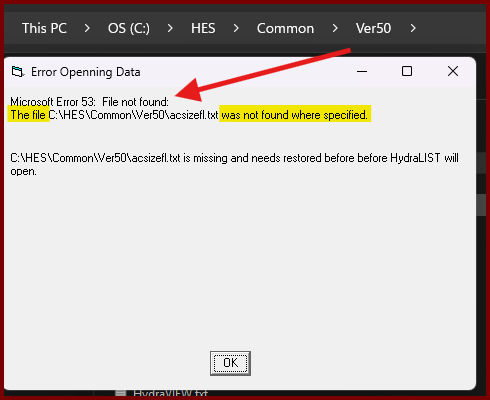
When attempting to open HydraLIST after a fresh install, you get the error;
[[ Error Openning (sic) Data ]]
Microsoft Error 53: File not found
The file ??? was not found where specified
"filenamehere is missing and needs restored before before HydraLIST will open" 🤦
Likely due to not following instructions with the install by not unzipping/extracting the downloaded .ZIP file.
The file in question will be indicated twice in the error message, so navigate to that location using Windows File Explorer and confirm the file is missing.
An easy solution may be to copy the file from a colleague and see if that works. However, since the program was installed via the zip file and not an extracted folder, there may be other issues.
FYI it's recommended you extract the zip to a new folder, then run the application file named SETUP/SETUP.EXE to run the program.
If the question of REPAIR/UNINSTALL/MODIFY comes up, it's recommended to choose UNINSTALL first and follow those prompts. Then re-run SETUP a second time to re-install HydraLIST