Need to save a card for later?
Create a bookmark folder in your browser of choice (Chrome, Firefox...), and save individual cards in your bookmarks to view here later.

Revit Based HydraLIST (Ribbon/Toolbar/Location)
Description:
Auto Stocklist hangs / freezes without a stocklist shown, or displays this error:
Processing Autolist... (Not Responding) ... Adding data to .HLF file
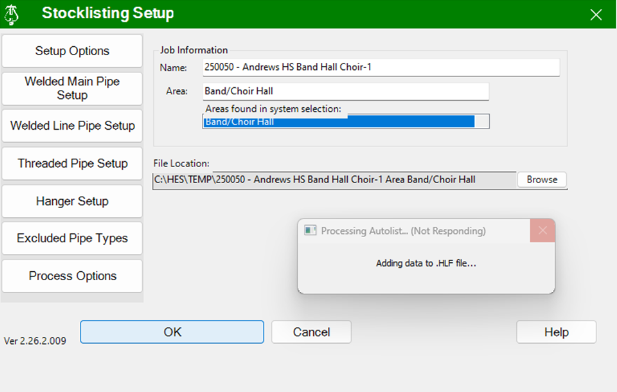
This is caused by a filename that can’t be used by windows to store the .HLF result file.
The file name is the compilation of the Job Name + the Area Name + File location. The file name and the area
name should be composed of ‘regular characters’ (that excludes special character like \ / & %, etc.) and
the file location must be locally available to your computer ie: c:\ , d:\ , etc (that excludes un-mapped
cloud references) In the example above the Area: was specified as Band/Choir Hall where / created the
problem.
Ensure that all three parts of the .HLF file name follow the constraints mentioned in the cause and rerun the process (i.e. having no special characters in file name). In the example above that simple requires that you remove the / from Area