AutoCAD Based Cards
Total: 726
* On smaller devices swipe left to view hidden table data
| Ribbon/Toolbar (Software) | Button | Function | Error Type | Description | ||
|---|---|---|---|---|---|---|
| Ribbon/Toolbar (Software) | Button | Function | Error Type | Description | ||
| Card 1100 View | HydraCALC (AutoCAD Based) | None | None | Unhandled Exception | Component TABCTL32.OCX or one of its dependencies no correctly registered: a file is missing or invalid Unhandled Exception n/a |
|
| Card 569 View | HydraCALC (AutoCAD Based) | Calculate | None | None | After calculating system this message pops up..."The specified remote head does not have a k factor. Please fix your input" hydcalc.exe |
|
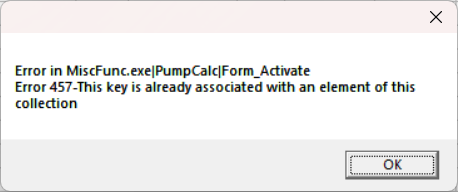
| Card 627 View | HydraCALC (AutoCAD Based) | Calculate | None | Runtime Error | Error in MiscFunc.exe|PumpCalc|Form_Activate Error 457-This key is already associated with an element of this collection
The error may also be a Runtime Error instead |
|
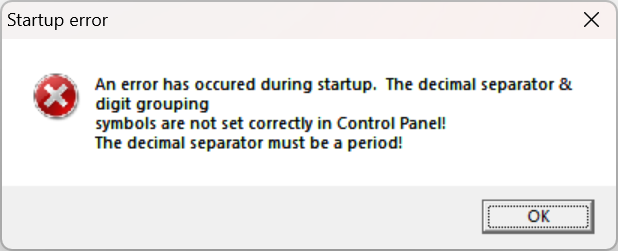
| Card 629 View | HydraCALC (AutoCAD Based) | None | None | None | When opening HydraCALC, you get this error. Startup error An error has occured during startup. The decimal separator & digit grouping symbols are not set correctly in Control Panel! The digit grouping symbol must be a comma! |
|
| Card 614 View | HydraCALC (AutoCAD Based) | None | None | Runtime Error | File not found HydexVB3 Runtime Error 48 or Runtime Error 53 Runtime Error 50 |
|
| Card 562 View | HydraCALC (AutoCAD Based) | Print Final | None | Runtime Error | Printing a calc shows this error in HydraVIEW; File not found Runtime Error 53
|
|
| Card 490 View | HydraCALC (AutoCAD Based) | Calculate | None | No Connectable Heads | Old or invalid plotters and plot styles (believe it or not) Slow Opening/Using Slow |
|
| Card 630 View | HydraCALC (AutoCAD Based) | None | None | None | Cut/Paste no worky HydraCALC |
|
| Card 605 View | HydraCALC (AutoCAD Based) | Calculate | None | None | Freezing during calculation in HydraCALC HydraCALC |
|