Need to save a card for later?
Create a bookmark folder in your browser of choice (Chrome, Firefox...), and save individual cards in your bookmarks to view here later.

AutoCAD Based Build 3D Risers (Ribbon/Toolbar/Location)
Description:
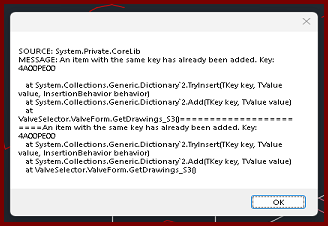
When selecting Valve Selector in the 3D Fittings window, you get the error message;
SOURCE: System.Private.CoreLib
MESSAGE: An item with the same key has already been added. Key:
The new version of HydraLIST Valve Selector has not been installed to the computer
Download the latest version of Valve Selector.
After installation, confirm you can open the program as a stand-alone application. Then test it via HydraCAD for AutoCAD and the 3D Fittings toolbar.