Need to save a card for later?
Create a bookmark folder in your browser of choice (Chrome, Firefox...), and save individual cards in your bookmarks to view here later.

Revit Based HydraCALC (Ribbon/Toolbar/Location)
Description:
Run-time error 9: Subscript out of range
Area 21 of 30
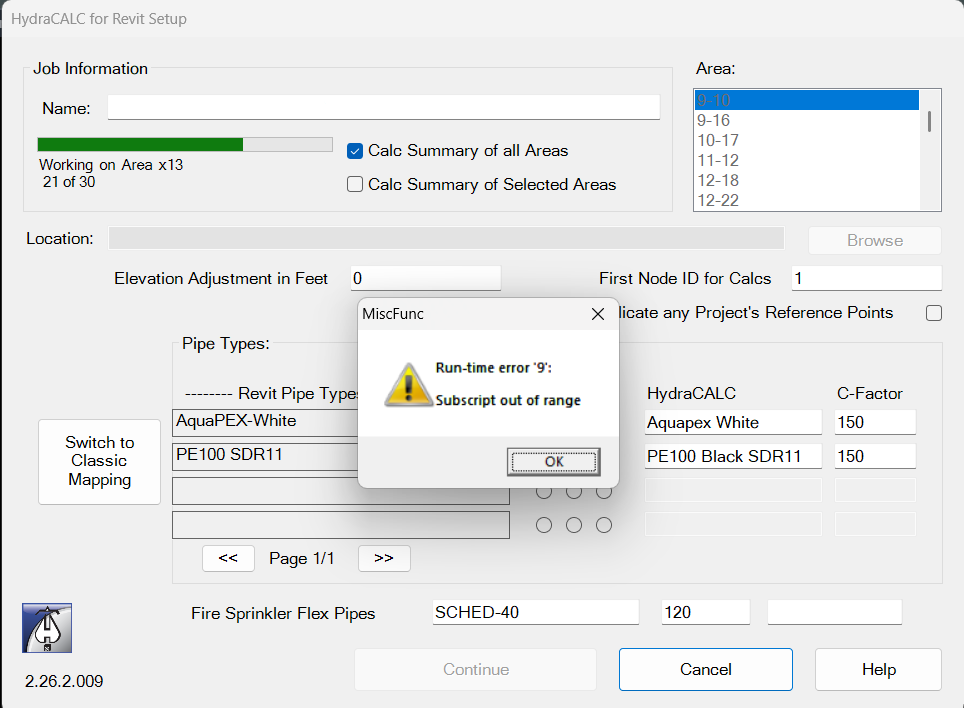
Issue seems to be related to the size and number of calculations in the project. It also seems that this problem may be more likely to occur depending on the processor speed of the computer being used.
If you encounter this issue and can provide additional information, please contact us at: RevitSupport@HydraCAD.com
Hydratec plans to address this issue in an upcoming update after the exact cause is determined.. However in the meantime: splitting the Calc up into 2 smaller parts will circumvent the issue.
Use the selection box to select fewer than 21 areas at a time, which will provide a
segmented summary to accomplish the required task.
In this particular example, since there were 30 areas to calculate, Selecting the 1st 15, and then the last 15 along with Calc Summary of Selected Areas provided usable results.